
Smart tools to plan, publish and promote your book
Fifteen author tools built in-house by Clever Fox Publishing: readiness audits, title and keyword research, description scoring, social graphics, 3D mockups, printed bookmarks and cards, plus free planning calculators. Every dashboard tool comes with a free first use.
Three steps to your first report
Create a free author account
Sign up on the Author Dashboard. You do not need to have published with us to use the tools.
Open Clever Tools
Every credit-based tool includes a complimentary first use, so you can try each one without paying.
Keep going with shared credits
After the free use, a single credit pack works across all the tools. Free web tools never need credits.
Prepare, publish and promote with data, not guesswork
Six credit-based tools inside the Author Dashboard. Screens below use sample data.
 Demo data
Book Pulse
Listing readiness audit
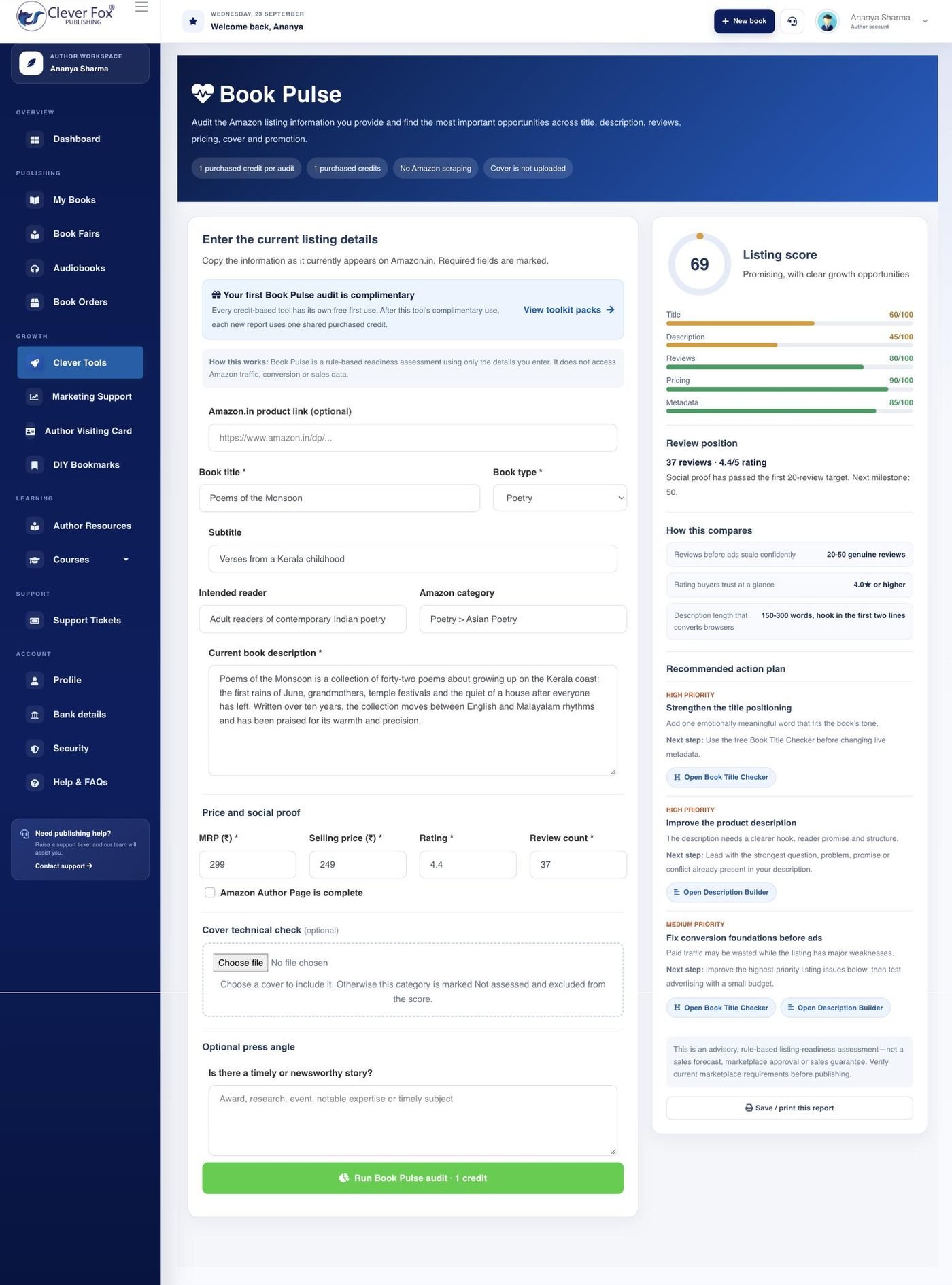
Paste the details from your Amazon listing and get a scored readiness report across six areas: title, description, reviews, pricing, cover and metadata.
- Six readiness scores with an overall listing score out of 100
- Review milestones and how your listing compares with buyer expectations
- A prioritised action plan that links straight to the tool that fixes each issue
- Open Clever Tools in your dashboard and choose Book Pulse.
- Paste your title, subtitle, description, price, category and review count from your Amazon listing (or pick one of your published books).
- Click Run Audit. Read the overall score and the six area scores.
- Follow the action plan from the top: each item links to the tool that fixes it. Re-run the audit after you make changes.
 Demo data
Book Title Checker
Compare up to five title ideas
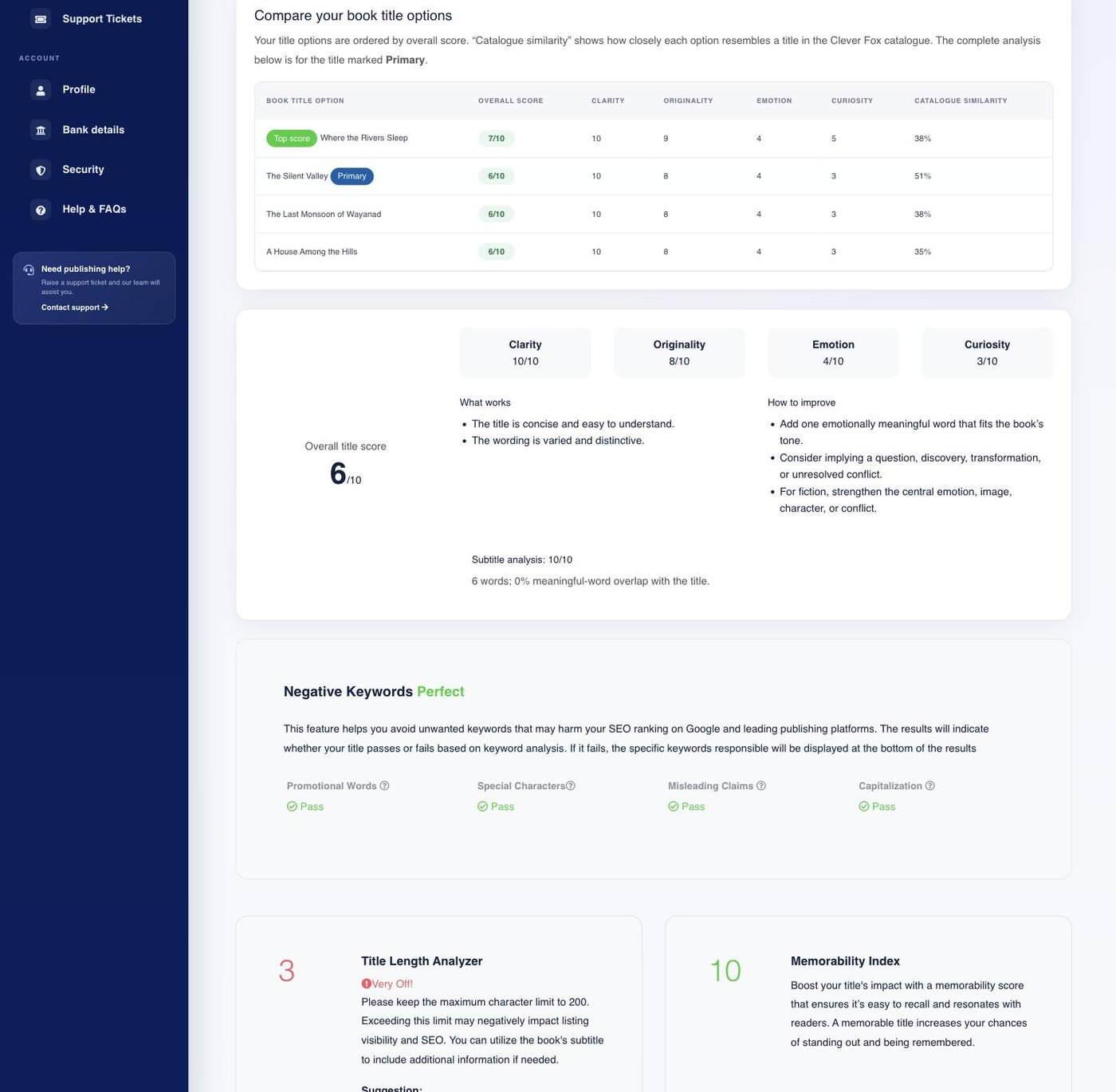
Enter your working title, a subtitle and up to four alternatives. The checker scores each option and shows which one readers are most likely to respond to.
- Scores for clarity, originality, emotion and curiosity, plus a catalogue-similarity check
- Negative-keyword, length and memorability checks for Amazon and Google
- Specific suggestions for strengthening your primary title
- Choose Book Title Checker and enter your working title and subtitle.
- Add up to four alternative titles you are considering.
- Select the genre and click Compare Titles.
- Pick the highest-scoring option, or apply the suggestions to your primary title and run it again.
 Demo data
Keyword Genius
Metadata phrases readers actually use
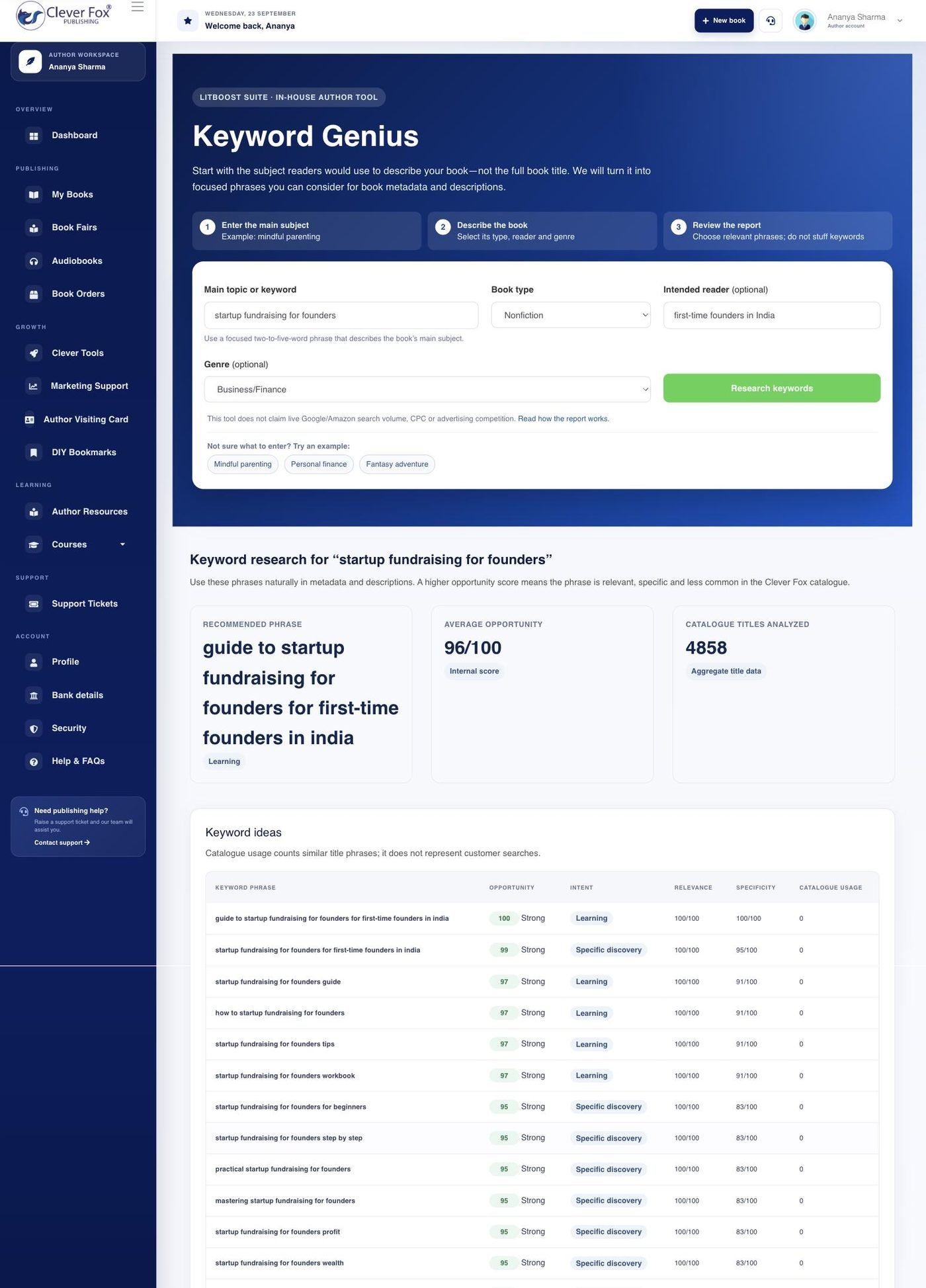
Start with the subject of your book, not the title. Keyword Genius turns it into focused phrases you can use in your metadata, categories and description.
- Opportunity score for every phrase, with intent, relevance and specificity
- Compared against 4,800+ titles in the Clever Fox catalogue
- Works for fiction and nonfiction, with genre and reader inputs
- Choose Keyword Genius and type the subject of your book in plain words (for example "startup fundraising for founders").
- Set genre, reader type and, optionally, your main competitor titles.
- Click Generate. Sort the list by opportunity score.
- Copy the top phrases into your Amazon and Flipkart keyword slots, categories and the first lines of your description.
 Demo data
Description Analyzer
Score your book description before you upload it
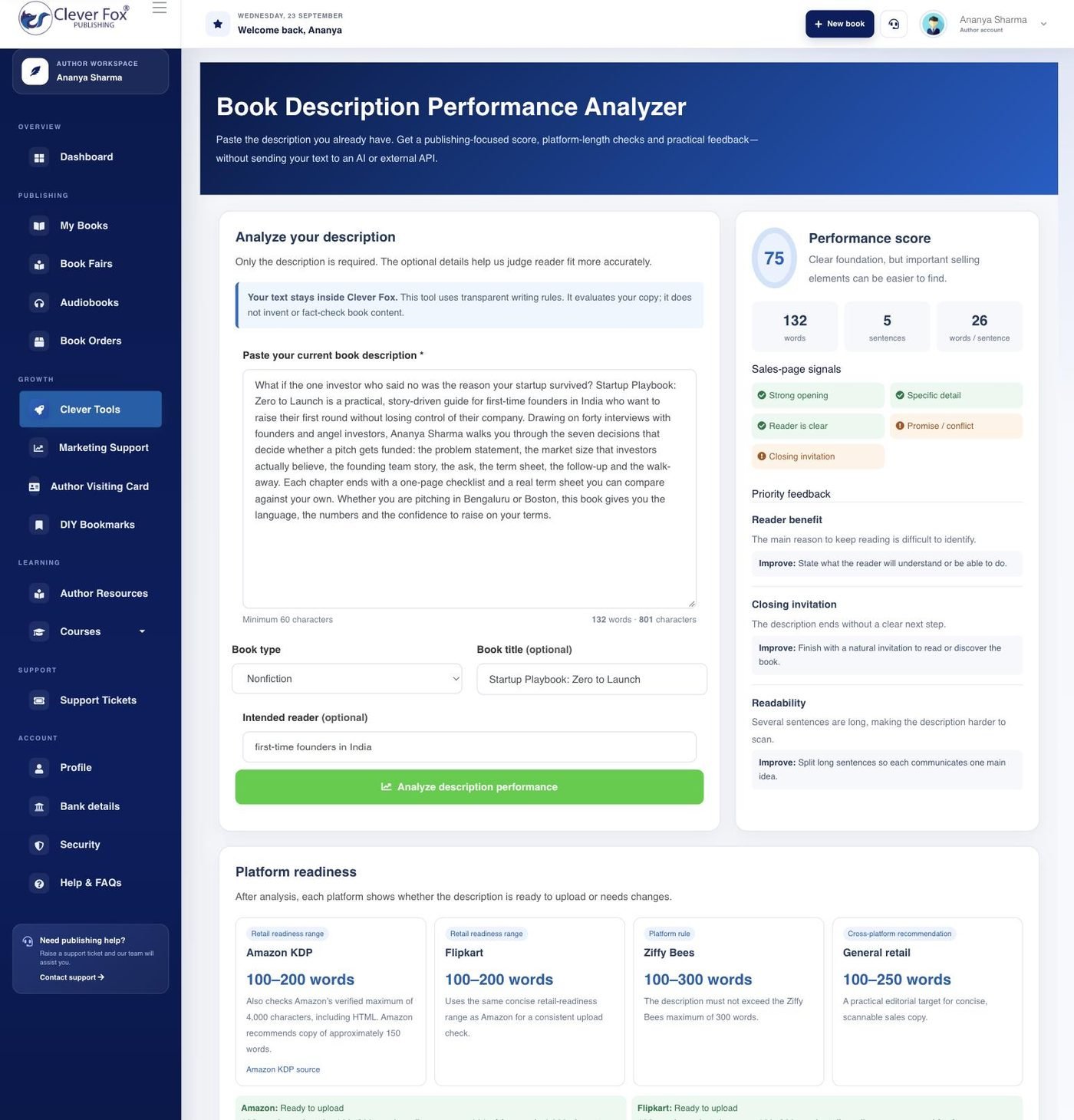
Paste your current description and get a performance score, sales-page signals and a platform-by-platform readiness check for Amazon, Flipkart and Ziffy Bees.
- Checks for a strong opening, reader benefit, promise and closing invitation
- Word, sentence and readability analysis with priority feedback
- Ready-to-upload verdicts per platform, with the exact length limits
- Choose Description Analyzer and paste your current description.
- Select where you will publish (Amazon, Flipkart, Ziffy Bees) and click Analyse.
- Fix the items marked High priority first: opening line, reader benefit and closing invitation.
- Check the per-platform verdict and length limits, then copy the final version to your listing.
 Demo data
Banner Studio
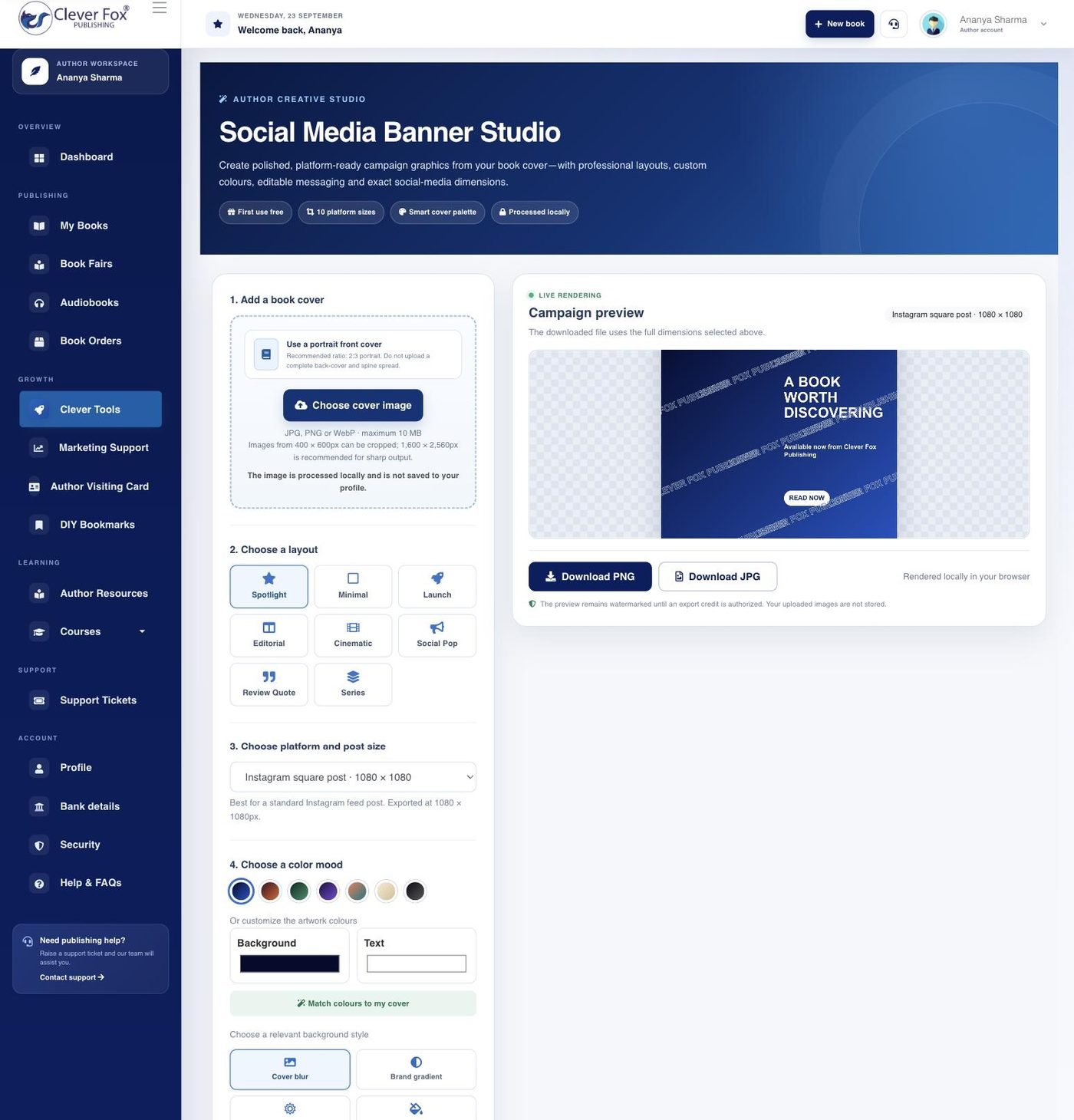
Social media graphics from your cover
Upload your front cover, pick a layout and a colour mood, and export campaign-ready graphics in the exact sizes each platform wants.
- Eight layouts: Spotlight, Minimal, Launch, Editorial, Cinematic, Social Pop, Review Quote and Series
- Ten platform sizes for Instagram, Facebook, LinkedIn, X and YouTube
- Colours matched automatically to your cover, editable messaging, PNG or JPG export
- Choose Banner Studio and upload your front cover (JPG or PNG).
- Pick a layout, then a colour mood; colours are pulled from your cover automatically.
- Edit the headline, tagline and call-to-action text.
- Tick the platform sizes you need and click Export to download PNG or JPG files.
 Demo data
3D Book Mockup Studio
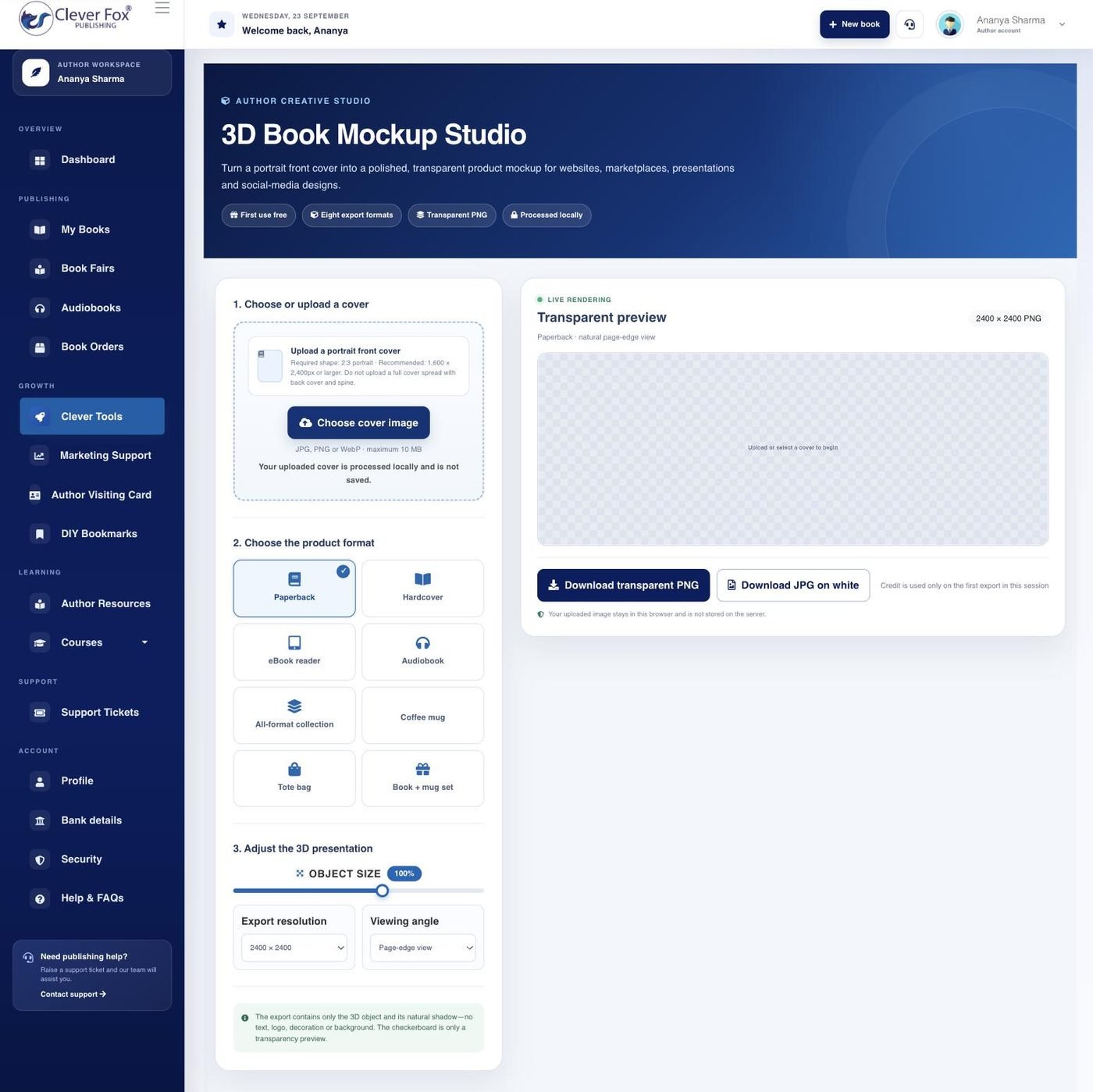
Product visuals for your book
Turn a flat cover into a polished, transparent 3D product image for your website, Amazon A+ content, presentations and social posts.
- Paperback, hardcover, eBook reader, audiobook, all-format collection, mug, tote bag and book-plus-mug set
- Adjustable size, viewing angle and export resolution up to 2400 × 2400
- Transparent PNG or JPG on white, rendered in your browser
- Choose 3D Book Mockup Studio and upload your front cover.
- Select a product: paperback, hardcover, eBook reader, audiobook, mug, tote bag or a set.
- Adjust the angle, size and export resolution with the sliders.
- Download as transparent PNG (for websites and A+ content) or JPG on white.
Design it in the dashboard, we print and deliver
 Demo data
DIY Bookmark Design & Print
Design it live, order printed copies
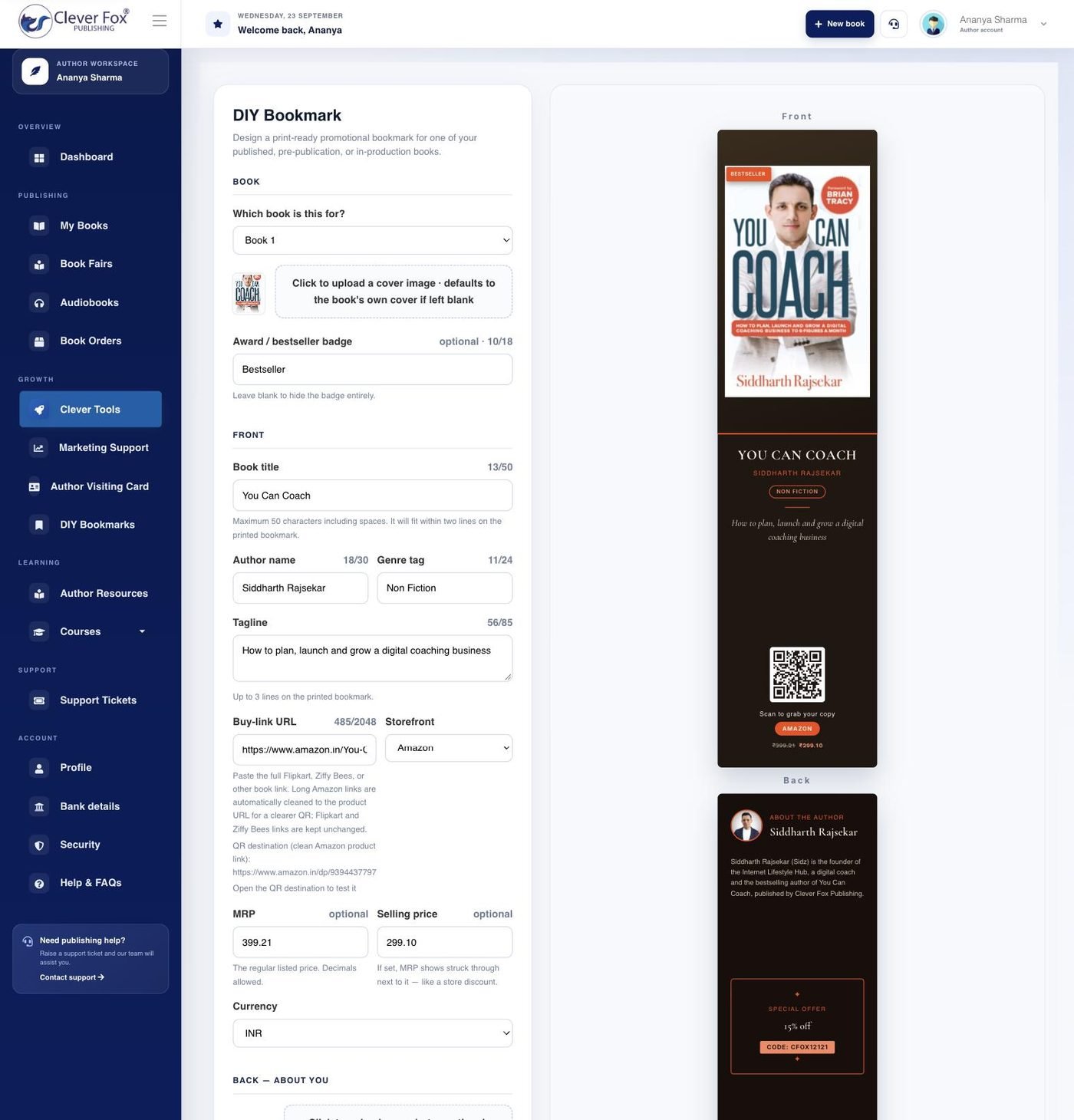
Build a two-sided promotional bookmark for any of your books with a live, print-accurate preview, then order professionally printed copies delivered to your door.
- Cover, title, tagline, genre tag and bestseller badge on the front
- Author bio, photo, special-offer code and a scannable buy-link QR on the back
- Order in quantities for launches, book fairs and signings
- Choose DIY Bookmark and select one of your books, or upload a cover.
- Fill in the front: title, tagline, genre tag and badge. Fill in the back: bio, photo, offer code and buy link (the QR is generated for you).
- Check the live preview on both sides.
- Choose the quantity, enter your delivery address and place the print order. You can also download a preview to share.
 Demo data
Author Visiting Card
A branded card for events and signings
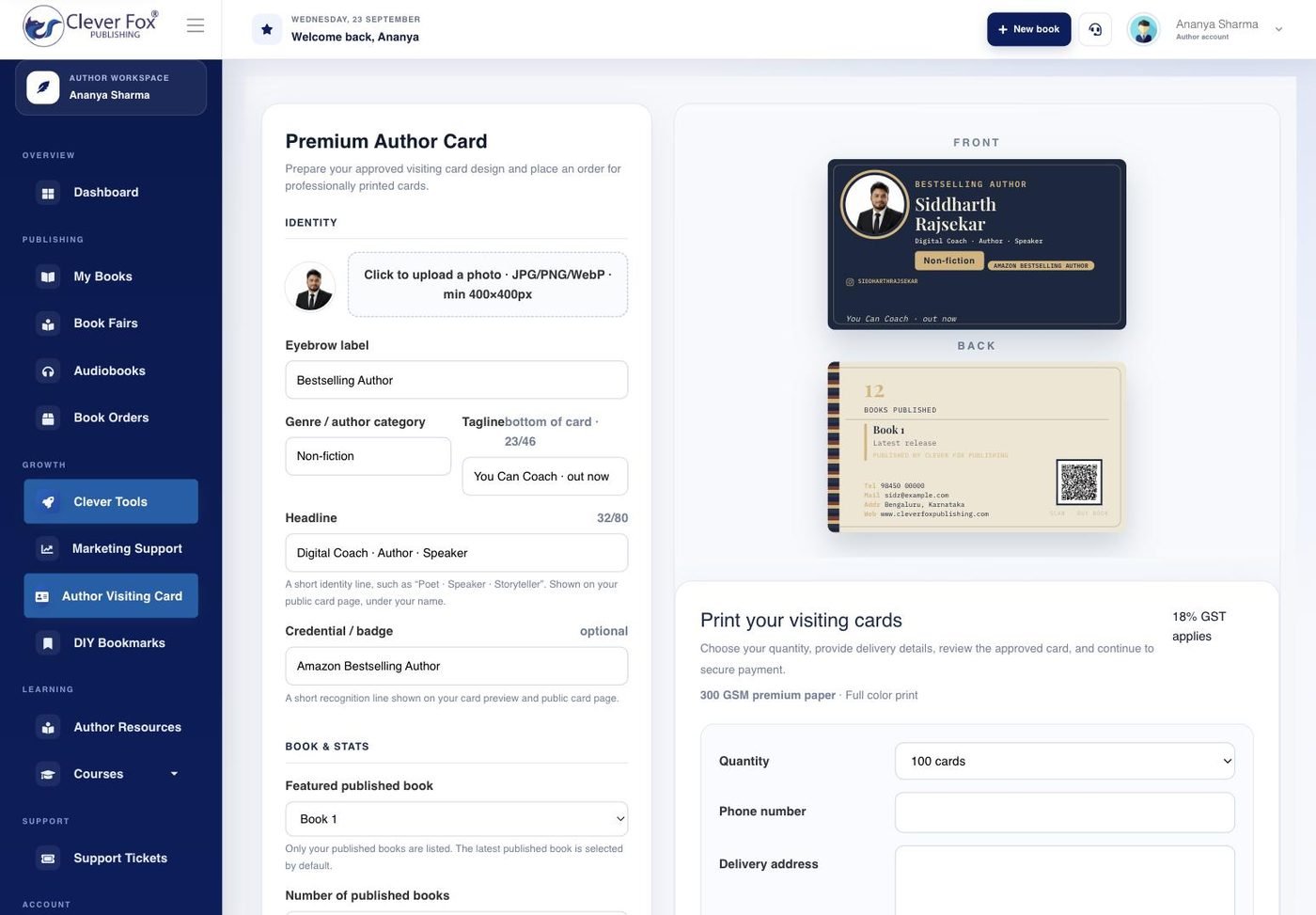
Create a premium author visiting card with your photo, books, credentials and contact details, preview it live and order print-ready cards on 300 GSM paper.
- Front: photo, name, genre, credential badge and social handle
- Back: books published, latest release, contact details and buy-link QR
- Full-colour print, GST invoice, delivered to your address
- Choose Author Visiting Card and upload your photo.
- Enter your name, genre, credentials, social handle and contact details; select your books and latest release.
- Review the front and back in the live preview.
- Choose the quantity and place the print order. A GST invoice is emailed to you.
Planning tools you can use right now, no login
Quick calculators and checkers on our website. Always free.
One balance, every tool
Each dashboard tool is free the first time. After that, credits from one shared pack are used across any tool. Prices exclude 18% GST.
Enough to run a Book Pulse audit, check a title and export a banner or mockup.
Buy in dashboardFor a full launch: audit, title, keywords, description, plus graphics for every platform.
Buy in dashboardFor authors with several titles or ongoing campaigns.
Buy in dashboardCommon questions
Do I need to publish with Clever Fox to use the tools?
No. Any author can create a free Author Dashboard account and use the tools. Published Clever Fox authors additionally see their own books pre-filled in the print tools.
What does “first use free” mean?
Each credit-based tool (Book Pulse, Title Checker, Keyword Genius, Description Analyzer, Banner Studio and Book Mockup) includes one complimentary run. After that, each run uses one credit from your shared balance.
Is my manuscript or book data sent to an outside AI?
The analysis tools are rule-based and run inside Clever Fox. Banner Studio and the Mockup Studio process your cover in your browser and do not store it on our servers.
Do credits expire?
Purchased credits stay in your account and can be used on any credit-based tool, for any of your books. New packs add to your existing balance rather than replacing it.
Try every tool once, on us
Create your author account in a minute and run your first Book Pulse audit today.